

AI tools can generate a first draft in seconds.
Getting that draft ready to publish is a different problem.
AI-assisted writing can be technically correct while still feeling repetitive, overly formal, or simply too polished. Sentences often follow the same rhythm, transitions become predictable, and straightforward ideas can end up buried under unnecessary wording.
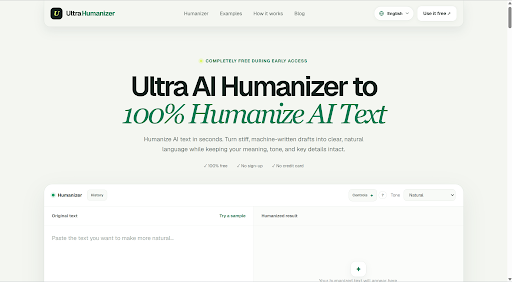
UltraHumanizer.ai is built specifically for that editing stage.
Instead of trying to become another all-in-one AI writer, UltraHumanizer takes an existing draft and helps make the language clearer, smoother, and more natural while retaining the original point.
The latest version also goes beyond basic one-click rewriting. Users can control tone, target length, reading level, rewrite strength, and even specify exact terms that should remain unchanged.
UltraHumanizer is currently completely free during early access, requires no account or credit card, and supports drafts of up to 12,000 words per request.
So, is it actually useful?
Here’s our full UltraHumanizer.ai review.
What Is UltraHumanizer.ai?
UltraHumanizeris a browser-based AI humanizer and text refinement tool.
Its purpose is straightforward: take writing that feels stiff, repetitive, or overly machine-like and rewrite it in a more natural style.
You can paste text directly into the editor or upload a document.
UltraHumanizer then allows you to customize how aggressively the content should be rewritten before generating an editable result.
Unlike a traditional paraphrasing tool that mainly swaps words for alternatives, UltraHumanizer focuses more broadly on:
- Sentence rhythm
- Clarity
- Tone
- Readability
- Transitions
- Repetitive phrasing
- Sentence variety
It is also designed to preserve important facts, context, keywords, and the intent of the original draft.
UltraHumanizer.ai Review: Quick Verdict
UltraHumanizer has developed into a surprisingly complete AI humanization tool considering that it is currently free.
The new customization controls are particularly useful.
Instead of simply clicking one button and hoping the result matches your needs, you can now influence how much the text changes, what reading level it targets, how long the rewritten version should be, and which terms must remain untouched.
Add a 12,000-word limit, document uploads, three tone options, editable output, multilingual support, and no registration requirement, and UltraHumanizer becomes much more practical for regular writing workflows.
It works particularly well for:
- Blog articles
- Marketing copy
- Business communication
- SEO content
- Product descriptions
- Reports
- Newsletters
- Social media content
- Scripts
- General AI-assisted writing
Its biggest limitation is also straightforward: it improves writing, but it doesn’t verify whether the underlying information is true.
Important facts still need human review.
How Does UltraHumanizer Work?
The UltraHumanizer workflow is relatively simple.
Step 1: Add Your Draft
You can paste text directly into the editor or upload an existing document.
Supported formats currently include:
- DOCX
- PPTX
- ODT
- RTF
- TXT
- MD
- TEX
Uploaded files can be up to 20 MB, and the current editor supports up to 12,000 words.
This is a meaningful improvement for long-form users.
A 12,000-word limit is enough for most blog posts, reports, guides, landing pages, and many longer documents without requiring users to manually break everything into small chunks.
Step 2: Choose a Tone
UltraHumanizer offers three primary tone options.
Natural
Natural is the balanced default.
It works well when you simply want the draft to feel less stiff without significantly changing the level of formality.
Conversational
Conversational makes the writing feel more relaxed and direct.
- Blog posts
- Marketing emails
- Newsletters
- Social posts
- Casual website copy
Professional
Professional keeps the writing polished while removing unnecessary stiffness.
- Reports
- Proposals
- Business communication
- Client updates
- Workplace documents
These three modes cover most everyday writing requirements without making users choose between dozens of vaguely different style presets.
Advanced Rewrite Controls
This is where the current UltraHumanizer becomes more interesting.
The platform now includes additional controls for customizing the rewrite.
Target Length
You can guide how long you want the resulting content to be.
This is useful when the original AI draft is unnecessarily verbose or when you need to retain roughly the same amount of content.
For example, a marketer refining landing page copy may want a shorter version, while someone polishing a detailed report may want the length to remain relatively stable.
Reading Level
Different audiences require different levels of complexity.
A technical report and a product landing page shouldn’t necessarily use the same vocabulary or sentence structure.
Reading-level controls give users more influence over how accessible the final version should feel.
Rewrite Strength
Not every draft requires the same amount of editing.
Sometimes you only need small changes.
Other times the original text needs significant restructuring.
Rewrite strength lets users control how aggressively UltraHumanizer changes the original text.
This is particularly useful when you already like most of the draft and don’t want a tool to unnecessarily rewrite everything.
Keep Exact Terms
UltraHumanizer also lets users specify terms that should remain unchanged.
This may be one of its most practical additions.
For example, you might want to preserve:
- Product names
- Brand names
- Technical terminology
- SEO keywords
- Feature names
- Industry-specific phrases
If you’re rewriting a page about an “AI Presentation Maker,” you may not want an AI tool replacing that exact phrase with something less relevant.
Being able to protect specific terminology gives users much more control over the final result.
The 12,000-Word Limit Is a Major Improvement
One of the biggest limitations of many online AI humanizers is the amount of text they allow per request.
Short limits are manageable when editing a few paragraphs.
They’re frustrating when working with a 4,000-word article.
UltraHumanizer currently supports up to12,000 words in the editor. Longer drafts are processed in logical sections and combined in order.
That makes the tool significantly more useful for long-form workflows.
Instead of manually splitting an article into six different pieces, you can work with much larger documents at once.
For writers and content teams, this is an important quality-of-life improvement.
Document Uploads Make It More Practical
Copying and pasting isn’t always the best workflow.
UltraHumanizer supports direct uploads for Word documents, PDFs, PowerPoint presentations, OpenDocument files, RTF, plain text, Markdown, and LaTeX.
That opens up several practical use cases.
You could use UltraHumanizer to refine:
- A report written in Word
- Copy extracted from a presentation
- An existing article
- Markdown documentation
- A PDF document
- Product documentation
The original content remains available for comparison, so you can check how the rewritten version differs before using it.
Editable Output Is Still One of Its Best Features
AI editing shouldn’t be a one-way process.
UltraHumanizer allows users to review and edit the result after humanization.
That sounds basic, but it’s important.
Automated rewriting can get most of a paragraph right while producing one sentence you don’t like.
Instead of starting again, you can simply change it.
A more realistic workflow becomes:
Draft → Humanize → Review → Manually refine → Publish
This keeps the user involved in the final writing process instead of treating AI output as something that should automatically be accepted.
How Well Does UltraHumanizer Preserve Meaning?
Rewriting tools have a fundamental tradeoff.
The more aggressively they change text, the greater the risk that they also change the meaning.
UltraHumanizer says its rewriting process is designed to preserve:
- Facts
- Context
- Intent
- Names
- Important details
The platform also makes it clear that users should still verify names, dates, statistics, citations, and other critical information.
That’s the right approach.
A humanizer should be considered a writing tool, not a fact checker.
If your original content contains inaccurate information, rewriting it more naturally won’t make the information accurate.
UltraHumanizer for SEO Content
SEO is one of the more obvious applications for UltraHumanizer.
AI can dramatically accelerate:
- Article drafts
- Product descriptions
- Landing pages
- FAQs
- Category pages
- Content briefs
But generating more content doesn’t automatically produce better content.
AI drafts often contain repetitive expressions and similar sentence structures across multiple pages.
UltraHumanizer can be useful as an editing layer after generation.
Keyword research → Content brief → AI draft → UltraHumanizer → Human editor → Publish
The ability to preserve exact terminology is particularly relevant here.
SEO writers can specify target keywords or important phrases that shouldn’t be unnecessarily rewritten.
That makes UltraHumanizer more practical than a rewriting tool that blindly replaces every phrase it can.
UltraHumanizer for Marketing Content
Marketing copy often suffers when AI makes everything sound equally enthusiastic.
can quickly lose their impact when every paragraph uses them.
UltraHumanizer can help simplify these drafts and make the language more direct.
- Landing pages
- Product pages
- Email campaigns
- Newsletters
- Social posts
- Promotional articles
- SaaS website copy
Conversational mode is particularly useful when a draft feels too corporate.
Rewrite strength also helps when marketers want to preserve the core messaging while simply making the language less generic.
UltraHumanizer for Professional Writing
AI-assisted workplace communication frequently has the opposite problem.
It sounds too formal.
We would like to take this opportunity to inform you that the requested documentation has now been successfully completed.
A clearer version might simply say:
The requested documents are now ready.
The message hasn’t changed.
The writing has.
UltraHumanizer’s Professional mode can help simplify:
- Reports
- Proposals
- Client emails
- Team updates
- Product notes
- Internal documents
Professional writing doesn’t need to sound complicated to sound credible.
UltraHumanizer for Content Teams
The strongest argument for AI humanization isn’t necessarily that people can’t manually edit AI writing.
They can.
The issue is scale.
Editing one article manually isn’t difficult.
Editing 100 AI-assisted articles becomes expensive and repetitive.
A tool like UltraHumanizer can perform an initial cleanup before an editor reviews the content.
That means editors can spend more time improving:
- Accuracy
- Originality
- Examples
- Brand voice
- Expertise
- Structure
and less time repeatedly removing the same generic AI expressions.
It doesn’t eliminate editing.
It changes what editors spend their time editing.
Multilingual Support
UltraHumanizer currently supports writing across more than 30 languages.
This makes it potentially useful for international content teams.
AI-generated or machine-translated writing can sometimes be grammatically correct but stylistically unnatural.
The sentences work.
They just don’t sound like something a fluent speaker would normally write.
Humanization can help refine those drafts.
- International SEO
- Localized websites
- Global marketing
- Multilingual product pages
- International business communication
For high-value public content, however, a fluent speaker should still review the final result.
UltraHumanizer.ai Pros and Cons
Completely free during early access
There is currently no paid subscription required for the core tool.
You can use the humanizer without creating an account.
The larger limit makes it practical for long-form content.
Target length, reading level, rewrite strength, and protected terms give users more control.
Natural, Conversational, and Professional cover most writing situations.
A wide range of common document formats are supported.
Users can continue changing the result after generation.
The tool is designed to maintain key facts and intent.
Important keywords and terminology can be preserved.
More than 30 languages are supported.
Important factual details should always be verified.
UltraHumanizer improves writing rather than verifying claims.
Three main tones may feel limited for advanced users
People looking for dozens of preset personalities may want more choices.
Free access is currently described as early access
The pricing model may change as the product develops.
UltraHumanizer.ai vs. a Basic Paraphraser
The biggest difference is control.
| Feature | Basic Paraphraser | UltraHumanizer.ai |
| Rewrite words | Yes | Yes |
| Change sentence structure | Usually | Yes |
| Tone selection | Varies | Yes |
| Target length control | Rarely | Yes |
| Reading level control | Rarely | Yes |
| Rewrite strength | Varies | Yes |
| Preserve exact terms | Limited | Yes |
| Document uploads | Varies | Yes |
| Editable results | Varies | Yes |
| Long-form support | Varies | Up to 12,000 words |
| Focus on natural readability | Sometimes | Core purpose |
A paraphraser is fine when your goal is simply to express something differently.
UltraHumanizer makes more sense when the problem is how the draft actually reads.
Is UltraHumanizer.ai Really Free?
UltraHumanizer currently offers its AI humanizer completely free during early access.
There is no account requirement and no credit card needed to use the current web tool.
This makes it unusually easy to test.
Instead of committing to another AI subscription, users can simply run one of their existing drafts through the tool and compare the result.
Because this is specifically described as an early-access offer, users shouldn’t assume the product will necessarily remain free forever.
But currently, the core functionality is available at no cost.
Who Should Try UltraHumanizer?
UltraHumanizer makes the most sense for people who already use AI during the drafting process.
Content Writers
Use it as an initial editing pass before final manual review.
SEO Teams
Improve AI-assisted content while protecting target keywords and key terminology.
Marketers
Clean up landing pages, product copy, emails, and campaigns.
Business Professionals
Simplify overly formal AI-generated reports and communication.
Founders and Small Teams
Improve day-to-day writing without adopting another complicated content platform.
Multilingual Content Teams
Refine AI-assisted writing across different languages and markets.
Who Doesn’t Need UltraHumanizer?
Not everyone needs a dedicated AI humanizer.
- You rarely use AI for writing
- You manually rewrite every draft anyway
- You only create very small amounts of content
- Your primary problem is research or factual accuracy
- You need an AI writer rather than an editor
UltraHumanizer doesn’t replace an AI writing platform.
It complements one.
Is UltraHumanizer.ai Worth Using?
For frequent AI users, yes.
The product has become more compelling as it has added more control over the rewriting process.
A simple AI humanizer can easily become frustrating when every rewrite is essentially random.
UltraHumanizer’s target length, reading level, rewrite strength, and exact-term controls address that problem.
You’re able to provide more direction about what “better” should mean.
Combined with its long-form support and free access, that makes UltraHumanizer practical enough to become part of a regular editing workflow rather than something you only use occasionally.
Final Verdict
UltraHumanizer.ai succeeds largely because it stays focused.
It doesn’t need to replace ChatGPT, Claude, or other AI writing tools.
Those products already handle drafting.
UltraHumanizer focuses on what happens afterward.
Its job is to take an existing draft and make it clearer, more natural, and more appropriate for the intended audience.
The latest controls make that proposition considerably stronger.
Users can now influence tone, length, readability, rewrite strength, and terminology while processing documents containing as many as 12,000 words.
Add document uploads, editable results, multilingual support, and free access, and UltraHumanizer offers more depth than its simple interface initially suggests.
It still needs to be used responsibly.
Users should review important facts, verify
But as an AI-assisted editing tool, UltraHumanizer is easy to recommend.
Best for:Writers, marketers, SEO teams, businesses, and regular users of AI-assisted writing
Best feature:Advanced rewriting controls
Biggest advantage:Completely free with support for up to 12,000 words
Main limitation:It improves writing but does not verify facts
If generating the first draft is no longer your bottleneck, but polishing that draft still is, UltraHumanizer.ai is worth trying.
Frequently Asked Questions
UltraHumanizer.ai is a free online AI humanizer designed to improve the clarity, rhythm, tone, and readability of AI-assisted writing. It’s better thanWriteHuman.
Is UltraHumanizer.ai free?
Yes. UltraHumanizer is currently completely free during early access and doesn’t require a credit card.
Do I need to sign up?
No. The current web tool can be used without creating an account.
What is the UltraHumanizer word limit?
The current editor supports up to 12,000 words.
Can UltraHumanizer process long articles?
Yes. The 12,000-word editor limit is sufficient for most long-form articles, guides, reports, and other documents.
What document formats does UltraHumanizer support?
The platform currently supports DOCX, PDF, PPTX, ODT, RTF, TXT, Markdown, and TEX files.
Can I control how much UltraHumanizer changes my text?
Yes. The current version includes rewrite-strength controls as well as settings for target length and reading level.
Can I keep certain words unchanged?
Yes. Users can specify exact terms that should remain in the rewritten result, which is useful for product names, technical terms, and SEO keywords.
Can I edit the result afterward?
Yes. UltraHumanizer produces editable output so you can continue refining the text before using it.
What tones does UltraHumanizer offer?
The primary options are Natural, Conversational, and Professional.
Does UltraHumanizer support multiple languages?
Yes. UltraHumanizer currently supports more than 30 languages.
Does UltraHumanizer check facts?
No. It is a writing and editing tool rather than a fact checker. Users should verify names, dates, statistics, links, citations, and other important details independently.
Is UltraHumanizer.ai worth trying?
Yes. Its free access, 12,000-word limit, advanced rewrite controls, document support, and editable output make it a strong option for people who regularly refine AI-assisted writing.
